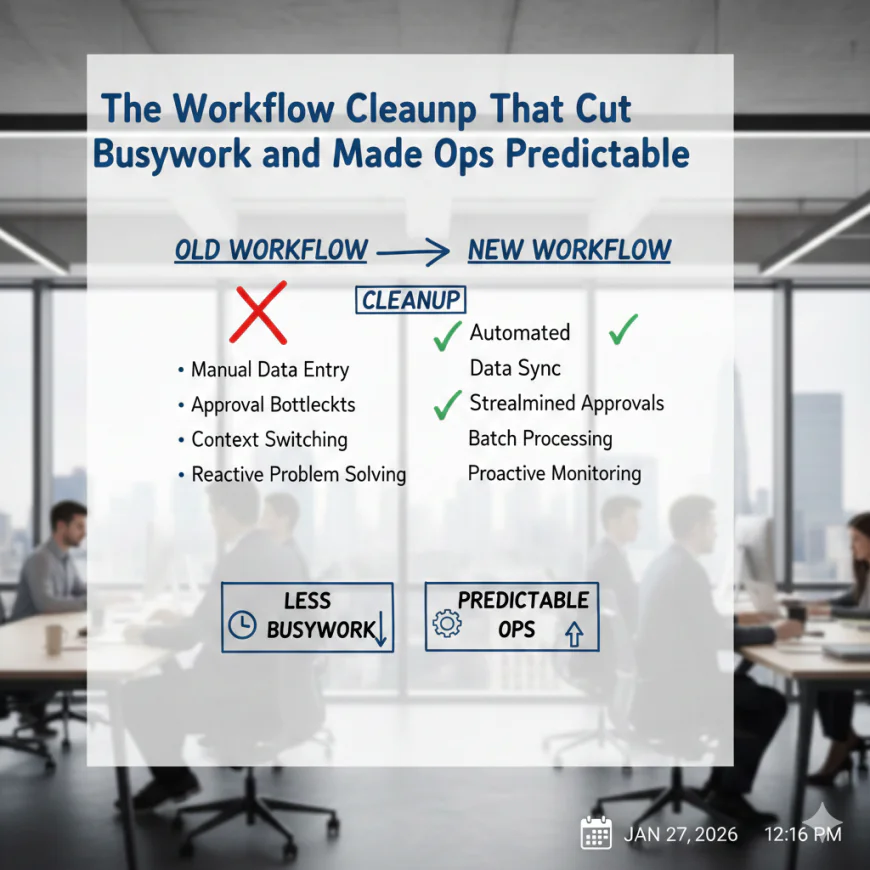
The Workflow Cleanup That Cut Busywork and Made Ops Predictable
Digital Process Automation (DPA) tackled the root of the issue by addressing the workflow’s inefficiencies.
 jamesthomas
In any operation, the promise of efficiency often felt like a distant goal. Teams spent their days juggling tasks, chasing approvals, and putting out fires, but progress often seemed slow and fragmented. Digital Process Automation changed that by cleaning up workflows, cutting out repetitive tasks, and creating a more predictable, smooth-running operation. By automating the manual, time-consuming processes, organizations could reclaim lost hours and focus on what truly mattered.
Why Operations Became a Maze of Busywork
In many organizations, work flowed like an endless loop of manual tasks. Requests came in, someone manually entered the data, a colleague followed up, then approvals were chased and tracked in email threads. In this constant back-and-forth, no one really knew what stage work was at, and nothing was really getting done quickly.
The result was “busywork” tasks that seemed productive but didn’t actually drive progress forward. Employees spent time searching for documents, following up on requests, and dealing with issues that were better handled automatically. This fragmented process not only wasted time, but it also created confusion, delays, and errors.
Even with a steady stream of work, the real problems surfaced when teams couldn’t predict when tasks would be completed or how long each step in the process would take. Without clarity, everything felt like an emergency.
A report from McKinsey showed that 45% of the tasks employees perform could be automated with current technology, yet many organizations struggled to adopt automation fully. This gap between potential and reality meant that much of the work was still stuck in the cycle of manual tasks and inefficiency.
The Role of Digital Process Automation
Digital Process Automation (DPA) tackled the root of the issue by addressing the workflow’s inefficiencies. Instead of relying on employees to manually track work, automate approvals, and search for data, DPA created systems where tasks flowed seamlessly from one step to the next.
Automating Routine Tasks
The first step in DPA was to automate repetitive tasks that added no value to the business. For instance, simple data entry, approval routing, and email notifications could be automated. This freed up employees from having to track the status of each task, allowing them to focus on more strategic work. By eliminating manual processes, the system became more predictable.
Streamlining Approvals and Reviews
Approval cycles had always been one of the biggest bottlenecks in operations. Work waited for signatures, feedback, or a decision that often came at the last minute. DPA streamlined this by automating approvals. The right people were notified at the right time, and decisions could be made faster without chasing emails or forms. For instance, invoices could be approved based on pre-set criteria, reducing the need for multiple reviews or manual tracking.
Real-time Monitoring and Tracking
One of the key benefits of DPA was the ability to track tasks in real-time. Unlike manual systems where people had to follow up and guess where a task was in the process, DPA provided a transparent system where the status of each task was visible to everyone involved. This visibility created accountability, reduced delays, and improved coordination across teams.
In addition, predictive analytics integrated with DPA systems allowed teams to forecast when tasks would be completed, further removing the uncertainty that plagued previous workflows.
Standardizing Processes
DPA also made it easier to standardize processes across the organization. Without automation, teams often ended up creating their own ways of handling tasks, leading to inconsistency. Digital Process Automation ensured that tasks followed the same steps every time, reducing the risk of errors and making the workflow more predictable.
This standardization also made training new employees easier, as they could follow the established process rather than figuring out their own method.
The Results of Workflow Automation
After implementing Digital Process Automation, many organizations reported significant improvements in efficiency. Tasks that once took hours were completed in minutes. Repetitive tasks that took up employees’ time were now automated, and the bottlenecks that slowed down work were cleared. Employees could focus on high-value work, while automation handled the repetitive, time-consuming processes.
Here’s a look at the results that most organizations experienced:
-
Increased Productivity: Teams spent less time on busywork and more time on strategic tasks that drove the business forward.
-
Improved Accuracy: With fewer manual steps, the risk of human error decreased significantly.
-
Faster Decision-Making: Automated approval processes and real-time monitoring made it easier to make informed decisions quickly.
-
Predictable Operations: Work started to flow more consistently, with fewer delays and surprises.
-
Better Resource Allocation: Employees could focus on work that required human judgment, while automation took care of the rest.
Conclusion
Digital Process Automation was the solution to the chaotic, unpredictable workflows that had plagued many organizations. By automating routine tasks, streamlining approvals, and providing real-time tracking, DPA reduced busywork and made operations more predictable. As organizations embraced automation, they experienced faster, more efficient workflows that freed up resources for higher-value tasks.
The next step was simple: identify the areas in your workflow that are the most manual and time-consuming, then implement automation to clear those bottlenecks. Over time, as more tasks are automated, teams can focus on driving results instead of getting bogged down in busywork. The future of operations is predictable, efficient, and automated.