
The Ultimate Guide to Laptop Monitoring Software: Boosting Safety and Performance in 2026
Looking for the best laptop monitoring software? Discover how to track productivity, enhance security, and protect your family with our expert guide to monitoring tools.
 WorkDesQ
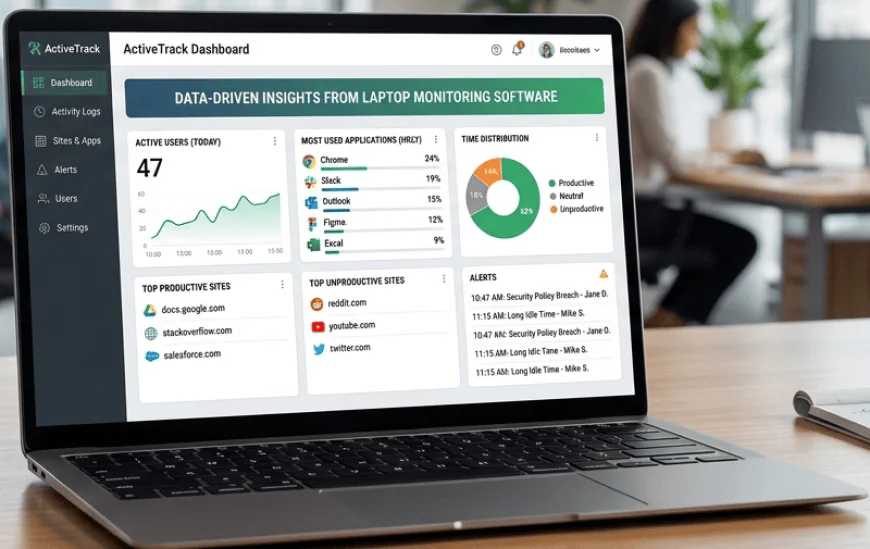
In today's fast-moving digital world, keeping a close eye on how devices are used isn't just about being "watchful"—it's about staying safe and staying productive. Whether you are a business owner managing a remote team or a parent trying to keep your child safe online, choosing the right laptop monitoring software is a vital decision.
With over 15 years in the tech and content industry, I have seen these tools evolve from simple trackers to high-tech assistants. This guide will walk you through everything you need to know about laptop monitoring software, ensuring you find a solution that is ethical, effective, and easy to use.
What is Laptop Monitoring Software?
Laptop monitoring software is a specialized tool used to track, record, and analyze activity on a laptop or computer. It provides real-time insights into how a device is being used, covering everything from website history and application usage to idle time and keyboard inputs.
-
For Businesses: It helps in tracking employee productivity, protecting sensitive company data, and ensuring remote teams stay focused during work hours.
- For Parents: It serves as a digital safety net, blocking harmful websites and monitoring social interactions to protect children from online risks.
- Key Value: The best laptop monitoring software offers a balance between deep visibility and user privacy, helping users make data-backed decisions to improve performance and security.
Why You Need Laptop Monitoring Software in 2026
The way we work and live has changed. With the rise of hybrid work and the ever-growing reach of the internet, the need for laptop monitoring software has never been higher. Here is why it is a must-have:
- Enhancing Workplace Productivity
For managers, laptop monitoring software isn't about "spying"; it is about understanding workflow. By seeing which apps take up the most time, you can find bottlenecks and help your team work smarter, not harder.
- Strengthening Data Security
Insider threats are a real concern. Laptop monitoring software can alert you if someone tries to download sensitive files or visit suspicious sites, acting as an early warning system against data breaches.
- Protecting Your Family
The internet is a vast place, and not all of it is friendly. Using laptop monitoring software allows parents to set healthy screen time limits and filter out content that isn't age-appropriate.
Key Features to Look Fo
Not all tools are created equal. When searching for the best laptop monitoring software, look for these essential features:
- Real-Time Activity Tracking: See exactly what is happening on the screen right now.
- Screenshot Capturing: Automatic snapshots of the desktop at set intervals provide a visual trail of activity.
- Application & Website Usage: Detailed reports on which programs are open and how long they are being used.
- Stealth vs. Visible Mode: Depending on your needs, you might want the software to run silently or be visible to the user.
- Alerts & Notifications: Get instant pings for "keyword triggers" or when a user visits a blocked site.
- Productivity Scoring: Some laptop monitoring software automatically labels activities as "productive" or "unproductive" to give you a quick health check of your team's day.
How to Choose the Right Software for Your Needs
Selecting the right laptop monitoring software depends heavily on your specific goals. Here is a quick breakdown to help you decide:
For Small Businesses and Startups
Look for tools that focus on time tracking and project management. You want laptop monitoring software that integrates with your current workflow (like Slack or Trello) to keep things seamless.
For Large Enterprises
Security and compliance are your top priorities. You need robust laptop monitoring software that offers forensic-level detail, such as keystroke logging and advanced threat detection.
For Home and Personal Use
Simplicity is key here. Choose laptop monitoring software that is easy to install and provides a clear mobile app so you can check in on your family's safety while you are on the go.
The Ethics of Monitoring: Doing it the Right Way
As a writer with years of experience, I always tell my clients that transparency is the most important part of monitoring. If you are using laptop monitoring software in a professional setting, follow these steps to maintain trust:
- Create a Clear Policy: Write down exactly what you are monitoring and why.
- Get Consent: In many places, it is a legal requirement to inform users they are being monitored.
- Focus on Results: Use the data from your laptop monitoring software to reward good work and offer support, rather than just finding faults.
- Protect the Data: Ensure the logs and screenshots captured by the laptop monitoring software are stored securely and only seen by authorized people.
Common Questions About Laptop Monitoring Software
Does it slow down the laptop?
Most modern laptop monitoring software is designed to be "lightweight." This means it runs in the background without hogging the computer's memory or making it lag.
Can it be detected by the user?
It depends on the settings. Most laptop monitoring software can be set to "invisible mode" where it won't show up in the task manager or on the desktop.
Is it legal?
Yes, in most cases, it is legal to monitor devices that you own (such as company laptops or a child's computer). However, laws vary by region, so it is always smart to check your local regulations.
Final Thoughts: The Future of Digital Oversight
Using laptop monitoring software is no longer just a luxury for big corporations. It is a practical tool for anyone who wants to ensure that time spent online is safe, productive, and meaningful. By choosing a high-quality solution and using it ethically, you can protect your assets and your loved ones with ease.
Whether you are looking for a boost in team efficiency or peace of mind at home, the right laptop monitoring software is your partner in navigating the digital age.
About the Author: With 15 years of experience in technical writing and software analysis, I specialize in making complex technology easy to understand. My goal is to provide honest, helpful advice that helps you choose the best tools for your life and business.